
These FAQs are here to guide you through starting your listing on the platform and how to get the most from your listing, and how the SearchCelebrants Directory supports you in growing a sustainable, visible celebrant business.
Why Choose SearchCelebrants Directory?
This Directory exists to make it easier for couples and families to find the right celebrant, and just as importantly, to help celebrants be found for the work they love to do.
This platform is more than a directory. It is a visibility tool, a credibility boost, and a long-term yet reasonably priced investment in your celebrant business – it also helps your SEO – this is a valuable backlink for your business. Your listing works for you around the clock, helping you show up in search results, showcase your unique style and ceremony or service types and connect with new clients.
Whether you are newly trained or well established, SearchCelebrants gives you a professional presence without the overwhelm of complicated marketing.
SearchCelebrants Pricing
This is a directory available to all Celebrants in Europe – no long tie in, no added extras to pay for – just month on month visibility to the outside world.
What is your investment?
- £11 per month for the first listing
- £2 per month for any subsequent listings.
Which Listings Are Available?
- Weddings
- Vow Renewals
- Vow Writing Services
- Speech Writing
- Funerals / Celebrations Of Life/Memorials
- Funeral Ceremony Planning
- Eulogy Writing
- Naming Ceremonies
- Alternative Ceremonies (You choose what you are offering)
Benefits Of Joining SearchCelebrants
- Highly competitive pricing – a cost-effective way to increase your visibility without the high fees or long contracts often associated with directories.
- Be found for multiple ceremony types – create listings for weddings, funerals, baby namings, celebrations of life, memorials and more, rather than being boxed into one label.
- Visibility for alternative and niche ceremonies, plus showcase additional services such as eulogy writing, life and legacy planning, renaming ceremonies, welcoming adopted children, and other non-traditional ceremonies.
- Tailor each listing to a different audience – adapt your wording, tone and imagery depending on who you are speaking to, whether that’s couples, families, or individuals planning ahead.
- No location limits – list in as many countries or counties as you work in, without restrictions on geography.
- Local visibility built in – be discovered by people searching within a 40-mile radius of your home base, ideal for those looking for a local celebrant.
- Space for client reviews – display genuine testimonials to build trust, credibility and reassurance at the point people are choosing a celebrant.
- Profile-led, not algorithm-led – your words, experience and approach take centre stage, not social media trends or paid advertising.
- Built by a celebrant, for celebrants – created with a real understanding of how celebrant businesses work and grow over time.
- Social media exposure from @searchcelebrants with a link to your SearchCelebrants listing
- A long-term visibility tool – your listing works quietly in the background, helping people find you through search, not just through social media.
Your First SearchCelebrants Directory Listing
The way SearchCelebrants Directory has been set up, is that a lot of information is entered on your first listing but any commonalities are taken over to your next listings – you can decide.
Choose your core or favourite type of ceremony for your first listing.
Please note – checking out with card details at the end of the process will save your data – you can always go back to add photos and other info but don’t risk having to start again!
If you need any support setting up, please click on the Contact Us Here button and we will help you every step of the way – but below are step by step instructions for your first listing.
It is recommended that you enter your listings via a PC or Laptop.
Create Your First Listing
- Is This Your 1st ‘Search Celebrants’ Listing?
- YES – You should only complete this form if it is your first listing. If you want to add more listings please go to My Account after you have created your first listing and add further ceremony types from there.
- Select Category
- Create your first directory listing – this is the main type of ceremony you want to advertise.
- Tick which listing you want to start with.
- You will be able to add others once this listing is published.
- Create your first directory listing – this is the main type of ceremony you want to advertise.
- Tick The Info Which Is Identical Across All Your Listings
- This saves you re-entering a lot of the same data for each listing – so get this right and your next listing will be quick.
- Select Category: ALWAYS Leave Empty
- Your Business Name:
- Do you have the same business name for your wedding, vow renewal, naming and funeral businesses?
- Yes (or you only do 1 type of ceremony): Tick
- No: Leave Empty
- Do you have the same business name for your wedding, vow renewal, naming and funeral businesses?
- Listing Description: ALWAYS Leave Empty
- Areas:
- Do you cover the same area for weddings and funerals etc?
- Yes (or you only do 1 type of ceremony): Tick
- No – you cover larger areas for weddings: Leave Empty
- Do you cover the same area for weddings and funerals etc?
- Searchable Words: ALWAYS Leave Empty
- Starting Price: Always Leave Empty
- Image For This Ceremony Type: ALWAYS Leave Empty
- Website:
- Do you have different web pages on your site for different services?
- Yes: Leave Blank
- No (or you don’t yet have a website yet): Tick
- Do you have different web pages on your site for different services?
- Facebook:
- Do you have the same Facebook account for your weddings and funerals?
- Yes: Tick
- No: Leave Empty
- Do you have the same Facebook account for your weddings and funerals?
- Instagram:
- Do you have the same Instagram account for your weddings and funerals?
- Yes: Tick
- No: Leave Empty
- Do you have the same Instagram account for your weddings and funerals?
- TikTok:
- Do you have the same TikTok Page for your weddings and funerals?
- Yes: Tick
- No: Leave Empty
- Email:
- Do you have the same Email Address for your weddings and funerals?
- Yes: Tick
- No: Leave Empty
- Do you have the same Email Address for your weddings and funerals?
- Phone Number: Tick (assuming you only have one phone number for your business!)
- Business Address: Tick
- Comments: ALWAYS Leave Empty and then your reviews will be sorted into the correct category.
- This saves you re-entering a lot of the same data for each listing – so get this right and your next listing will be quick.
- Your Business Name
- Self-explanatory!
- Listing Description
- Make your first sentence really punchy as this will be displayed on some views. Tell us why we should contact you – what makes you someone they should contact?. If your first name is not in your business name – try and include it in your description – it will help searches. Tell us which areas you cover so that as they are reading your description they can really resonate with it.
- Areas: Countries or Counties or Towns For Ceremonies
- Note down where you would like to work – the words you are using are important keywords – so make sure you include Countries (including where you live), Counties or areas of the country and Cities/Towns that are relevant – it all helps you to be found in searches. (This can be written in paragraph or list format).
- Services & Areas Covered
- Keywords that you would like to be found for eg handfasting. Importantly – select the areas of the country that you are keen to work in. This is evolving so message if your region is not yet available.
- Starting Price
- No symbols or words – just your starting price for this type of ceremony.
- Image For This Ceremony Type (Upload ONE photo per listing)
- Landscape formats look better on the directory.
- If your photo is too big – you will need to reduce the size. You can use free online programmes such as www.befunky.com and TinyPNG.com to make you images smaller OR Email it to yourself and choose a medium size attachment (this will strip out alot of the pixels!)
- Website
- Put a link to the most relevant page of your website (it’s a good backlink for your website optimisation!) They will discover more about you when they move to your website.Leave blank if you don’t have a website yet.
- Facebook
- Your Facebook Business Page URL can be found in the top box of your facebook page – it will follow the format shown on the form.
- Instagram
- As above (leave blank if not relevant).
- TikTok
- As above (leave blank if not relevant).
- Email
- This is obligatory – it is your main form of contact with your clients unless they go to your website.
- Phone Number
- Do not enter if you do not want it shown on the website as it will be visible.
- Business Address
- Start typing your address – it should pre-populate it for you as you type. You can then move the pin if you don’t want it exactly on your property (the pin shows on the map but the address is not shown on the directory website).
- Submit Listing
- This will take you to check out – if you stop before checking out, your listing will not yet be published.
- If you don’t finish the checkout and want to go back to submit please go to https://searchcelebrants.com/profile/{username}/add_listing or contact Admin for this link to be sent to you.
Make Your Search Celebrants Profile Look Even More Professional
Congratulations! Now you have created your first listing, please make sure you are signed in to My Account.
Upload A Photo Of You
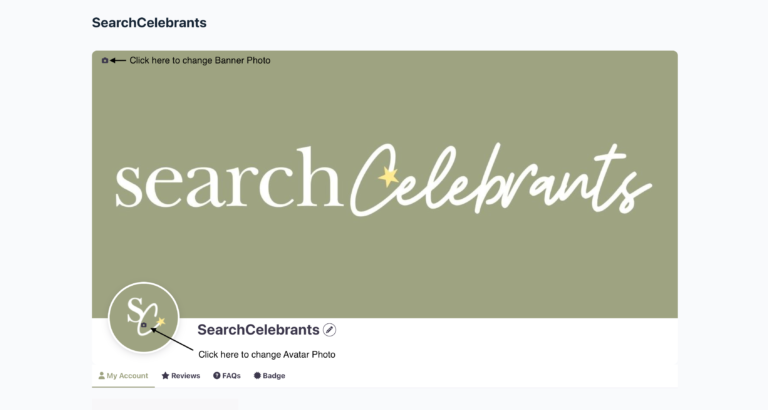
Avatar Photo: Upload a clear, welcoming profile photo of you (or your logo if you don’t have a photo yet) by clicking the circular box with the camera icon. This image represents you as a person, regardless of ceremony type, so choose something warm, professional and easy to recognise.
Optional Banner Photo
Banner Photo: You can also upload a banner image to replace the SearchCelebrants green box (It is not obligatory). This image should reflect your overall business and brand, rather than a single ceremony type.
Your Subsquent Listings
Make sure you are signed in to My Account.
Click on the tab Edit or Add Listings.
Press on any button that says +Add New Listing
Any information that you marked as Identical across all listings will be prepopulated when you publish. If it asks you to re-enter information that was already entered or will not let you change something on this listing, go back to your first listing in your Account Area and click on Edit Listing to change the information you want or don’t want to be the same across all your listings.
Submit Listing
It will ask you for payment details again – as each listing will be billed separately.
Edit Your Listing
Make sure you are signed in to My Account.
Click on the tab Edit or Add Listings.
Click the Edit button on the listing you want to change.
The listing on the far bottom right is your Master listing – do not delete this without talking to Admin through the Contact Us Here button.
Delete Your Listing
We would hate to lose you but if for any reason you would like to delete one or all of your listings, please contact Support with all the details.
Reviews
If you have received a review that you would like to copy and paste onto your account, click on your listing that the users see by going to www.searchcelebrants.com then search for your name and then click on your REVIEWS button – make sure you give yourself 5 stars!!
Tip: Ask your clients to leave reviews for you too! Copy your listing URL and send it to them.
The more stars you receive – the more you will be noticed!
Blogs
If you would like to write a Blog about any area of celebrancy – please use the contact form to give your subject title and we will give you all the details on where to submit your words and photos. By writing a Blog for SearchCelebrants you will be credited and gain a valuable backlink to your website!